How to Think About This Chapter
This chapter is about more than knowing software vocabulary. You need to understand how software fits into a larger ecosystem, how different categories of software support different business goals, and why managers need to care about software choices even if they are not programmers.
A strong answer should connect software to organizational coordination, customer relationships, data management, decision-making, lock-in, compatibility, and competitive advantage. Do not just define terms. Explain how they matter.
Core Vocabulary and Concepts: Click Links for Helpful Graphics
Application
Software is a set of instructions that tells hardware what to do, and applications are software programs that users interact with directly to perform tasks. In this chapter, user applications are one of the major software categories.
Business Intelligence (BI) Systems
BI systems provide reporting and decision support. Their value is helping managers interpret data and make better decisions rather than just storing transactions.
Customer Relationship Management (CRM) Systems
CRM systems support customer-related sales and marketing activities. They help firms track customers across the customer lifecycle, across channels, and identify high- and low-value customers.
Database Management System (DBMS)
A DBMS is software used for creating, maintaining, and manipulating data. Most enterprise software works with a DBMS, which is why data management is central to how modern organizations operate.
Distributed Computing
Distributed computing means software or computing work is spread across more than one machine. In this chapter, that idea connects to whether software runs locally or is hosted on another computer.
Enterprise Resource Planning (ERP) Systems
ERP systems integrate many functions needed in an organization. The key idea is coordination: instead of isolated departments using disconnected tools, ERP links major business functions together.
Konana’s Model of the Software Ecosystem (click to view)
Konana’s ecosystem shows layered dependence: hardware, operating system, DBMS, middleware, enterprise applications, and consumer applications. Because each layer depends on the layers beneath it, the ecosystem creates lock-in.

Middleware
Middleware sits between lower-level systems and applications. In the ecosystem model, it helps connect and support enterprise applications that rely on operating systems and databases underneath.
Operating Systems (click to view)
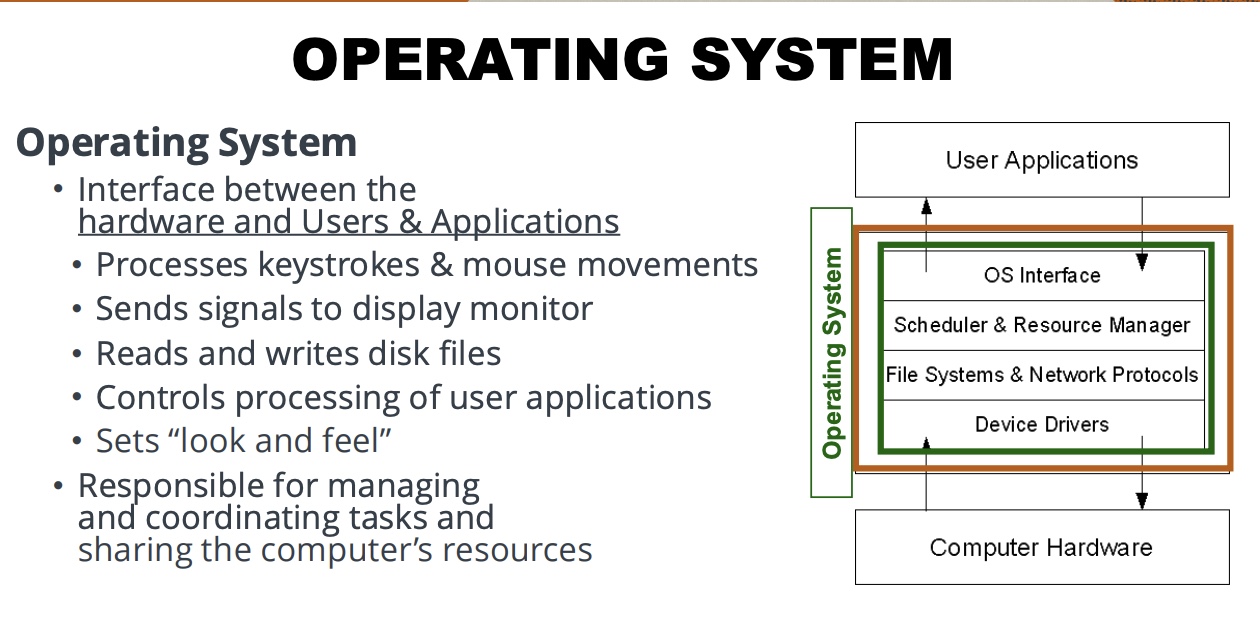
The operating system is the interface between hardware and users and applications. It processes keystrokes and mouse movements, sends signals to the display, reads and writes files, controls user applications, sets the look and feel, and manages the computer’s resources.
Supply Chain Management (SCM) Systems
SCM systems help firms manage aspects of the supply chain. One important idea from the slides is that SCM can help reduce the bullwhip effect by improving coordination and information flow.
User Interface and Graphical User Interface (GUI) (click to view)
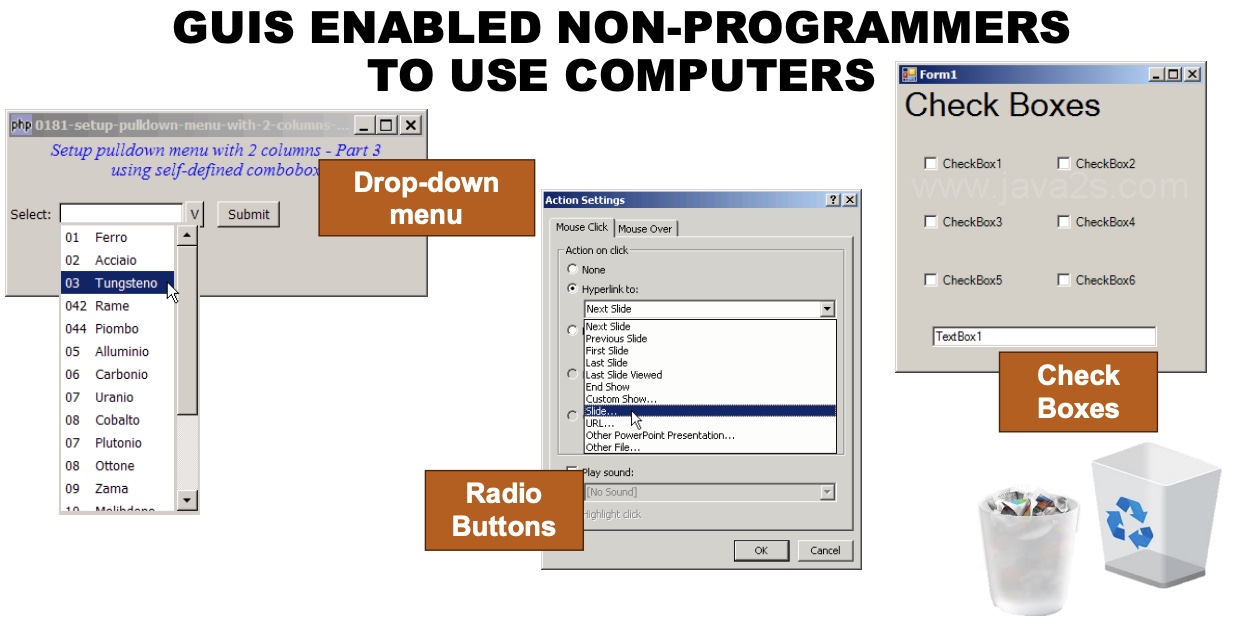
A GUI makes software easier for non-programmers to use. Before GUIs, users had to work at the command line and know more computer language. GUIs enabled broader computer use through visual tools like menus, radio buttons, and check boxes.
Key Relationships You Should Be Able to Explain
- Software tells hardware what to do, but different kinds of software operate at different layers and serve different users.
- Konana’s model helps explain why software choices create compatibility issues and lock-in.
- Operating systems make both user interaction and application execution possible.
- GUIs lowered the barrier to computer use by making systems accessible to non-programmers.
- DBMS software supports the data foundation that enterprise systems rely on.
- ERP integrates many organizational functions, while CRM, SCM, and BI each support a narrower business purpose.
- Managers should care about software because software affects coordination, efficiency, customer relationships, and decision quality.
- You can classify software in four different ways, not just by what it does.
Study Questions with Full Answers
1) Why should a manager care about software and how software works?
Managers should care because software influences how work gets done across the organization. Software affects coordination, compatibility, user experience, data access, reporting, and the ability of departments to work together.
It also affects competitive factors such as customer relationships, decision-making speed, supply chain performance, and organizational lock-in. Even if a manager is not writing code, they are still making choices about software that shape business outcomes.
2) What critical organizational and competitive factors can software influence?
Software can influence internal coordination, productivity, customer service, data quality, reporting, resource planning, and process integration.
Competitively, software can shape switching costs, compatibility, decision support, customer retention, and supply chain responsiveness. The broader point is that software architecture affects both how a firm operates internally and how well it competes externally.
3) What does an operating system do?
The operating system is the interface between hardware and users and applications. It processes input like keystrokes and mouse movements, sends output to the display, reads and writes files, controls processing of user applications, sets the system’s look and feel, and manages the computer’s shared resources.
In simple terms, the OS is what makes the computer usable and coordinated rather than just a box of hardware.
4) Why do you need an operating system?
You need an operating system because every computing device needs a system that coordinates the hardware, applications, and user interaction. Without it, users and applications would have to manage hardware directly.
The OS makes computing practical by handling common tasks and standardizing how applications interact with the machine.
5) How do operating systems make a programmer’s job easier?
Operating systems make programming easier because programmers do not have to individually manage every hardware action from scratch. The OS provides a structured environment for input, output, file handling, and resource management.
That means programmers can build applications on top of the OS instead of reinventing the basic functions of computing.
6) How do operating systems make life easier for end users?
Operating systems make life easier for end users by giving them a usable interface, managing applications, handling files, and creating a consistent look and feel.
This is especially important when combined with GUIs, because GUIs let non-programmers interact with software visually instead of through command-line instructions.
7) What are the four ways you can answer the question, “What kind of software is it?”
The first way is by asking what it does, or what layer of Konana’s ecosystem it belongs to, such as operating system, DBMS, or user application.
The second is by asking who can change the source code: closed source or open source.
The third is by asking where the code is executed: locally on the machine or hosted on another computer.
The fourth is by asking what kind of standards are used: open or closed.
8) Which functions of a business might be impacted by an ERP system?
ERP systems can affect many major business functions because they are designed to integrate functions across the organization rather than isolate them.
That can include planning, operations, accounting, inventory-related processes, customer-facing processes, and other core organizational workflows that depend on shared data and coordination.
9) What is a DBMS, and why does it matter?
A DBMS is software used for creating, maintaining, and manipulating data. It matters because enterprise software usually depends on organized, accessible, and manageable data.
In other words, many business systems would not work well without a reliable database layer underneath them.
10) How are SCM, CRM, and BI systems different?
SCM focuses on the supply chain and helps firms manage supply chain activity. CRM focuses on customer-related sales and marketing activity and helps track customers across their lifecycle and channels. BI focuses on reporting and decision support.
They are related because all are important enterprise tools, but they solve different organizational problems.
High-Value Compare / Contrast Points
- Operating System vs Application: the OS runs and coordinates the environment; applications perform user tasks inside that environment.
- Open Source vs Closed Source: anyone can change the code versus only the owning company’s employees can change it.
- Local vs Hosted: runs on your machine versus runs on another computer and requires network access.
- Open Standards vs Closed Standards: compatible development without permission versus owner-controlled compatibility.
- ERP vs CRM vs SCM vs BI: broad organizational integration versus customer management, supply chain management, and reporting/decision support.
- GUI vs Command Line: visual interface for broad usability versus text-based interaction requiring more technical knowledge.
Application Practice
Use these prompts to practice answering with connected reasoning.
- Why might choosing certain hardware or an operating system create lock-in for a user or business?
- How can a GUI expand the market for a software product?
- Why would a company want hosted software instead of locally run software?
- Why is ERP more about integration than just having “a lot of software”?
- How could CRM and BI work together in a business setting?
- Why would a manager care whether standards are open or closed?